
It watches
Your balance, your floating P&L and every position, live. It knows how much of today's limit you've used before you do.
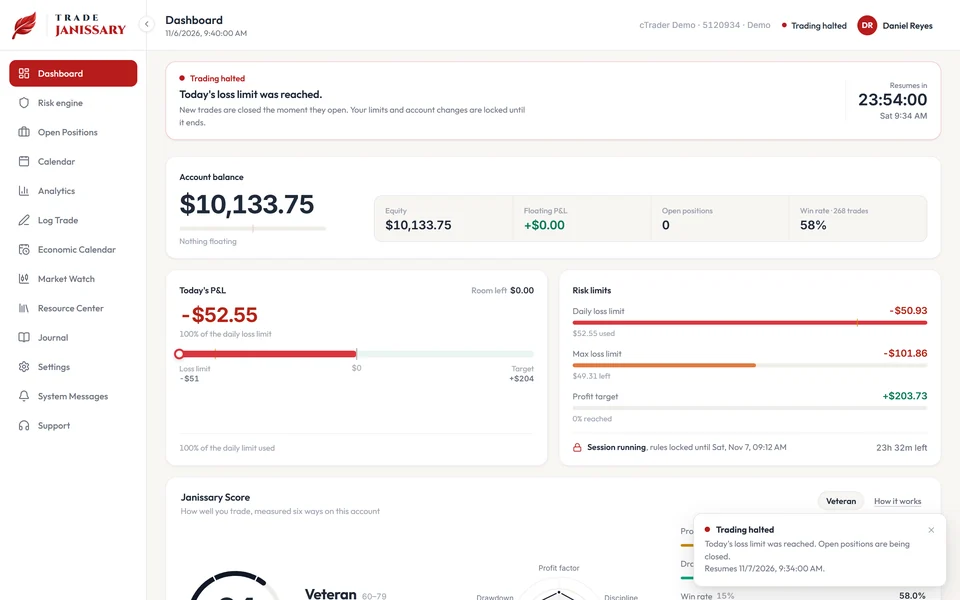
The Risk Engine is the risk management software at the heart of Trade Janissary, and it watches your account all day. Hit your daily loss limit and it closes every open trade, then locks you out of trading for 24 hours. Anything you open while you're locked out is closed the moment it appears.
01 / What it does
Most trading risk management tools only warn you. A stop loss guards one position and you can move it. The Risk Engine guards the whole account for the whole day, and it runs on our servers, so it keeps working when your laptop is closed.
Your balance, your floating P&L and every position, live. It knows how much of today's limit you've used before you do.
Break a rule and it sends a market close for every open position at once and cancels pending orders placed during the lockout.
For the rest of the lockout, any new trade, from any device or app, is closed as soon as it appears. You can't trade your way back in.
02 / A bad day, minute by minute
A $10,000 account with a 1% daily loss limit, so the day ends at -$100. This is the sequence the Risk Engine follows, in order.
03 / Your rules
Every limit is a percentage of your balance at the start of the day, so it grows and shrinks with the account. Breaking any one of them starts a lockout. You set them before your first trade; after that they're locked for 24 hours.
The most you're allowed to lose today, with open trades counted. This is the rule that saves accounts.
1% of $10,000 = locked out at -$100A second, harder floor for the day, for markets that move straight through your daily line before anything can react.
4% = hard stop at -$400Bank a good day. Reach it and your trades are closed before overconfidence gives the profit back.
2% = done for the day at +$200Catches the oversized, emotional entry. Open anything above your cap and a lockout starts on the spot.
Cap 0.50 lots, open 1.00 = locked outStops you stacking position on position to force a move that isn't there.
Max 3 open, a 4th = locked outHow long trading stays locked once a rule is broken. It's the same for everyone and you can't shorten it.
Always 24 hours04 / How the limit is counted
Today's P&L is everything you've closed since midnight plus the floating result of what's still open. Holding a loser and hoping doesn't hide it from the limit.
The limit is set at the start of your day from that morning's balance and follows the money you move: a withdrawal lowers it at once, a deposit raises it at once. Neither counts as profit or loss. Once you've used 80% of the limit, or you're locked out, a deposit waits for tomorrow, so topping up on a bad day can't buy you more room.
A $5,000 deposit at 10:00 isn't profit: it raises the limit to $150. Made after 80% of the limit is used, it waits for tomorrow.
05 / Locked means locked
Every trader with rules has broken them. The rules didn't fail; the off switch did. So once you've placed your first trade, the off switch is gone for 24 hours, and so is the option to move your limits.
06 / The smart risk engine
Optional, and off until you turn it on. It reads the closed trades on your account from the last 90 days, sets your daily and max loss limits from how you've really been trading, adds a weekly loss limit and keeps you out of the market around high-impact news.
| Your last 90 days | Daily loss limit | Max loss in a day | Weekly loss limit |
|---|---|---|---|
| Losing moneyMore lost than won, over 20 or more trades | 0.5% | 1% | 2% |
| New, or about evenFewer than 20 trades, or holding your own | 1% | 2% | 3% |
| Clearly profitable30 or more trades, and you've won at least 1.5 times what you've lost | 1.5% | 3% | 5% |
It never sets a limit looser than your own. If you'd already chosen a 0.3% daily limit, it stays at 0.3%. One day that cost 5% of the account or more puts you a step tighter.
Everything you've closed since Monday midnight in your time zone, plus whatever is still open, measured against your balance at the start of the week. Reach the limit and every open trade is closed and trading locks for seven full days, counted from that moment. Anything you open in those seven days is closed as soon as it appears.
Each new week starts with a fresh look at your results. If they've got worse, your limits tighten straight away. They only loosen after two profitable weeks in a row, and then by one step. New limits never arrive in the middle of a session or a lockout: they wait until it ends.
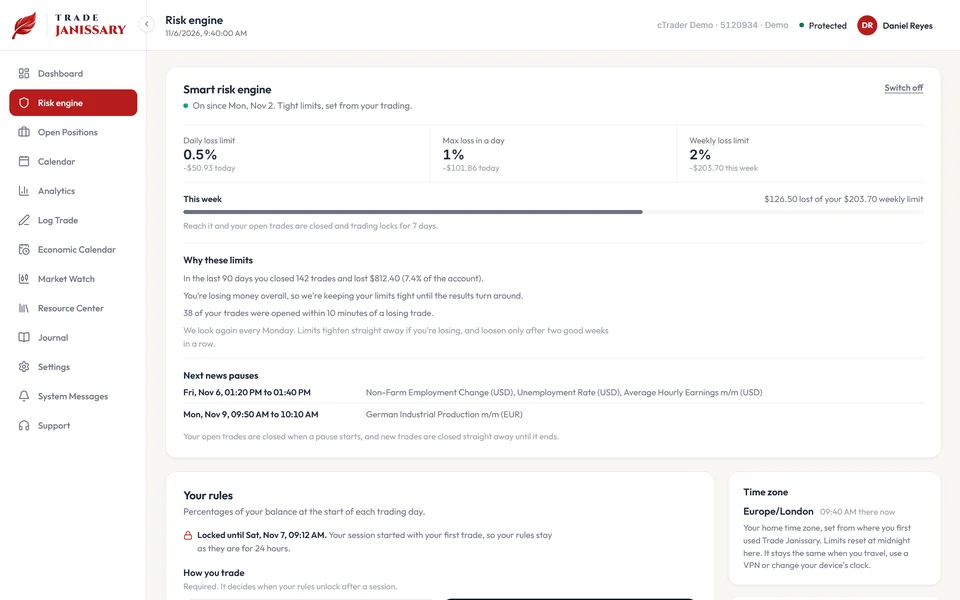
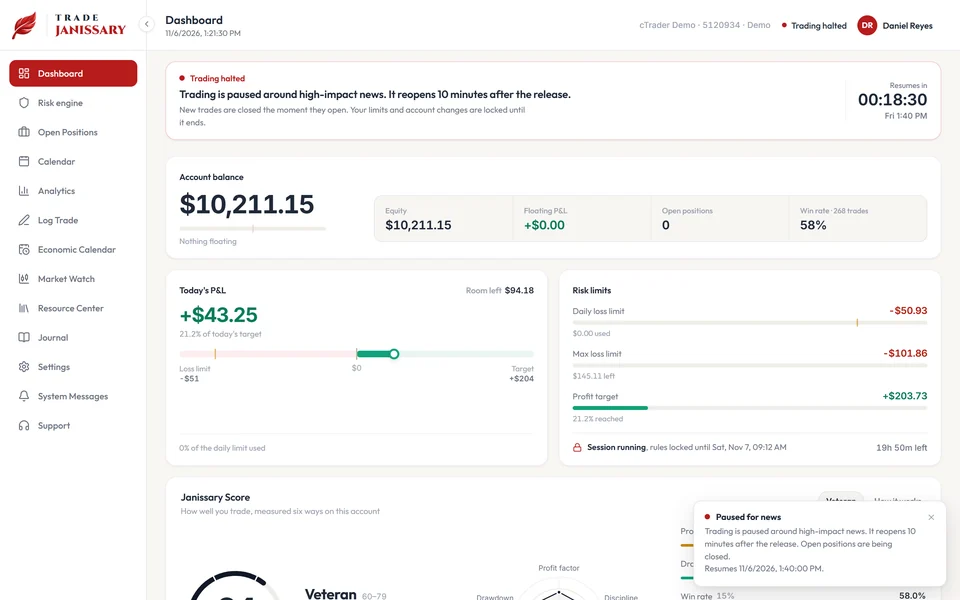
When high-impact news is due for the US dollar or any currency you've traded in the last 90 days, the smart risk engine pauses trading from 10 minutes before the release until 10 minutes after it. Spreads widen and prices jump in those minutes, and a stop loss can fill far from where you put it.
These are fixed rules applied to your own account. They don't predict the market and they aren't financial advice.
07 / The record and the fine print
Your risk record shows how much Janissary saves you from losses. Every lockout, every trade it stopped and every position it closed is counted into one figure: the losses it kept off your account.
Behind that figure is the full log, with the time of every event. Save it as a PDF whenever you want. Its QR code opens a check page on tradejanissary.com, so a prop firm, or anyone you show it to, can see the statement is genuine.
What no software can promise. A broker will always accept an order, so Janissary closes a trade the moment it appears rather than stopping it being placed. Positions close at market price: in a fast market, on a news spike or across a weekend gap the fill can land past your limit, and a broker, platform or internet outage can delay a close. Trade Janissary makes a blown account far less likely. It can't make losses impossible. The full details are in the Risk Disclosure.
Keep reading
Most blown trading accounts come from one bad day, not a bad strategy. The psychology behind it, the recovery maths and the fix that works.
Read the articleTrading journal4 min readWhat to record in a trading journal, how to review it, which patterns to look for and how to keep the habit going, with a simple daily and weekly routine.
Read the articleTrading psychology4 min readWhat trading discipline really means, why most traders struggle with it, and a practical system of rules, routines and enforcement to build it.
Read the articleTrade Janissary opens to the public soon. Join the waitlist and we'll email you the day it does. Your account should still be there at the end of the month.
Public launchComing soon
 cTrader
 MetaTrader 5
For forex, CFD and prop firm traders, with any broker that offers them.